
Find your parts diagram
Sticker on the pump body (the part with the basket), not on the motor. Motor labels from Century, A.O. Smith or Regal won't match parts.
Label on the side of the tank near the base. Size is in sq ft, e.g. 420 sq ft = C4030 or CCP420.
Rating plate inside the front access panel. Note the BTU and gas type (NG or LP).
Molded into the body or printed on top. Robotic cleaners: on the power supply.
Still not sure? Call (818) 818-6559 and we'll find it for you.

Pentair IntelliCenter Valve Expansion Module - Adds 6 Valves | 522038Z
Fits these models (2)
Shipping times are estimates, not guarantees.
Couldn't load pickup availability
● 4 in stock30-day returns Secure checkout
Have a question about this part?
Ask about fit, specs or shipping and get an instant answer.
Goes with this part
Manuals & documents
CA P65 Warning: Cancer and reproductive harm. www.p65warnings.ca.gov
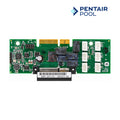
Need more automated valves? The Pentair IntelliCenter Valve Expansion Module (522038Z) plugs into your IntelliCenter main load center and adds six more valve actuator ports. That gives you room for water features, spa spillover, solar, and extra zones, all run from the IntelliCenter app or control panel.
- Adding more automated valves - water features, spa spillover, solar, or suction/return zones.
- Replacing a failed valve expansion module.
- Part: Pentair IntelliCenter Valve Expansion Module
- Part number: 522038Z (MFR 522038)
- Adds: 6 valve actuator ports (Valves C-H)
- Total with base system: 10 valve actuator ports
- Mounts: expansion slot in the IntelliCenter main load center
- Limit: one valve expansion module per load center
- Pentair IntelliCenter control systems (main load center)
- Not for EasyTouch or IntelliTouch systems
- Turn off all power to the load center at the breaker first.
- Open the load center and remove the dead front.
- Plug the module into the expansion slot on the main board and secure it.
- Connect the valve actuators to the new ports.
- Restore power and assign the new valves in the IntelliCenter setup menu.
Note: Valve actuators sold separately. Installation should be done by a qualified pool technician or electrician. See the IntelliCenter Expansion Card Installation Guide.